Leave your phone
in the locker
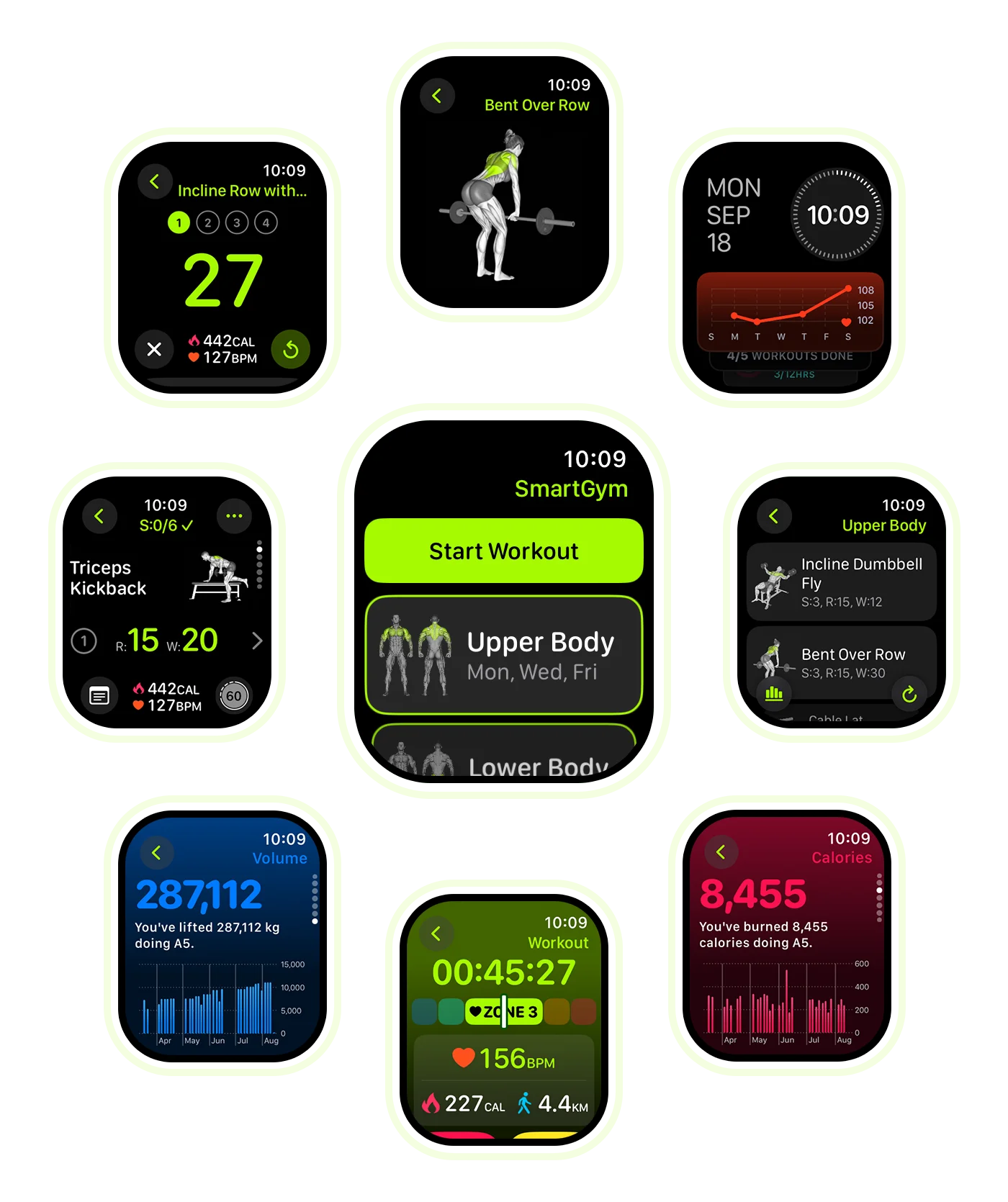
Most Watch apps are stripped-down companions. SmartGym is the full thing. Completely independent, no phone or internet needed.

App Store Awards
2023 Winner
Apple Watch
App of the Year


No phone. No Wi-Fi.
No problem.
SmartGym runs entirely on your Watch. No iPhone nearby, no internet connection. Train anywhere, and everything syncs automatically when you're back online.
Glance down.
Start lifting.
Your full routine with exercises, sets, reps, weight, rest timers, and instructions. Organized and ready the moment you raise your wrist.


A tap when it's
time to move
Log a set, rest timer starts. When it's time, a gentle haptic tap on your wrist. No staring at a countdown. Stay in the zone.
It builds your workout.
Then learns from it.
Tell it your goals and equipment. The AI builds a workout. After each session, it adapts by adjusting weights, reps, and exercises based on how you actually performed.
An entire workout. Without ever touching the screen.
Double Tap predicts your next move. Log a set, start a rest timer, advance to the next exercise. From the first rep to the last, your hands stay where they belong.

Everything you need.
Nothing you don't.

Your progress. At a glance.
Monthly volume, routine stats, and exercise-level progress. All in clear charts right on your Watch.

One button. Every action.
SmartGym predicts what you need next. Press the Action Button to start a rest timer, log a set, or advance to the next exercise.

Change anything. Mid-set.
Swap an exercise, adjust weight, or add extra sets. Just a few taps on your Watch. No grabbing your phone.
Your workout, your way

Your workout on your Watch Face
Add SmartGym complications to any Watch Face. One tap to launch a workout or check weekly stats.

Your stats, one scroll away
SmartGym widgets live in your Smart Stack and appear right before your usual training time, so you're always one tap away.

Hey Siri, let's work out
Start a session, jump to a specific routine, pause, or end your workout. All with your voice.
Every detail. Right here.

Log every detail. Your way.
Advanced Logging lets you edit weight, reps, and rest on the fly and log each set precisely. Switch to it from the More tab, or keep the default one-tap interface.

One tap to train
SmartGym adds a button to Apple Watch Control Center. One swipe, one tap, and you're training.

Listen. Don't read.
Every exercise has detailed instructions. Now you can listen to them right from your wrist. Just hit play and focus on your form.
More than just sets and reps.

Machine taken? Swap from your wrist.
Smart Trainer suggests alternatives based on the same muscle groups. Swap mid-workout with a tap. Works completely offline.

Your goals. Always visible.
Set weekly, monthly, or yearly workout targets. Track streaks and progress right from your Watch Face complications and Smart Stack.

Every zone. On your wrist.
Color-coded heart rate zones appear in real time. The zone bar sits at the top of the screen, and the background changes color as your intensity shifts.
Apple Watch FAQ
Can SmartGym work on Apple Watch without an iPhone?
Yes. SmartGym runs entirely on Apple Watch with no iPhone nearby and no internet connection required. You can access your full workout routine, log sets, use the AI Smart Trainer, and track progress completely from your wrist. Everything syncs automatically when you reconnect.
Does SmartGym support the Apple Watch Ultra Action Button?
Yes. SmartGym fully supports the Apple Watch Ultra Action Button. The app predicts what you need next and maps it to the Action Button. Press it to start a rest timer, log a set, or advance to the next exercise without touching the screen.
Can I use Siri to control SmartGym on Apple Watch?
Yes. SmartGym supports Siri voice commands on Apple Watch. You can start a workout session, jump to a specific routine, pause, or end your workout entirely with your voice.
Does SmartGym have Apple Watch complications and widgets?
Yes. SmartGym offers Watch Face complications for one-tap access to launch workouts or check weekly stats. It also includes Smart Stack widgets that show your next workout, weekly progress, and recent stats.
What can SmartGym track on Apple Watch?
SmartGym tracks everything right from your wrist: exercises, sets, reps, weight, rest timers, heart rate, heart rate zones, distance, calories burned, 1RM estimates, workout volume, routine stats, and exercise-level progress. All of it displayed in clear charts directly on your Apple Watch, and it all syncs seamlessly to your iPhone, iPad, and Mac.
Does SmartGym support Double Tap on Apple Watch?
Yes. Double Tap seamlessly guides you to the next step in your workout. It works dynamically: log a set, start a rest timer, or move to the next exercise. Available on Apple Watch Series 9, Series 10, and Ultra 2.
Can I swap exercises mid-workout on Apple Watch?
Yes. If a machine or piece of equipment is occupied, you can swap to an alternative exercise directly from your Watch. Smart Trainer suggests the most similar exercises. The change only applies to the current session, and it works completely offline.
Does SmartGym show heart rate zones on Apple Watch?
Yes. Color-coded heart rate zones appear in real time during workouts. The zone bar displays at the top of the workout screen, and the background color changes dynamically as your heart rate moves between zones.
See every feature
in detail
Read the full breakdown of what makes SmartGym the most capable Watch app ever built.